
More Google reviews means better local rankings, more trust from first-time visitors, and more sales. But most businesses collect reviews by accident and wonder why the number barely moves.
This guide covers the methods that actually work, in order of impact. Start with the first one and you'll see results within days.
Table of Contents
- Ask automatically after every purchase
- Keep your Google Business Profile complete
- Collect feedback at checkout
- Display reviews on your store
- Respond to every review
- Make it easy to find your review link
- Frequently asked questions
Ask automatically after every purchase
This is the single most effective thing you can do. Most customers who had a good experience simply forget to leave a review, not because they don't want to, but because nobody asked.
Sending an automated email 2-3 days after delivery, when the product is in their hands and the experience is fresh, converts at a much higher rate than any other method.
The Reputon Customer Reviews app handles this automatically. It sends a review request email after each order, links directly to your Google review form, and lets you customize the timing and message. No manual work after setup.
Pro tip: Keep your email short. One sentence asking for a review, one button linking directly to your Google review form. The more clicks between your customer and the review form, the fewer reviews you get.
Keep your Google Business Profile complete
Before you ask anyone for a review, make sure your profile gives them something worth reviewing. A complete profile also ranks higher in local search, which means more organic visibility before anyone clicks.
- Business name, address, phone
- Hours including holidays
- Business description
- Categories (up to 10)
- Cover photo and logo
- Products or services
- Keyword stuffing in business name
- Fake or inaccurate address
- Outdated hours
- Low-quality or no photos
- Wrong category
Collect feedback at checkout
The moment a customer completes a purchase is one of the highest-engagement points in the whole journey. Use it.
The Collect reviews at checkout feature in the Google Reviews app adds a satisfaction question to the Shopify checkout page. Happy customers are sent straight to Google to leave a review. Unhappy ones go to a private form, so you can resolve the issue before it becomes a public review.

Display reviews on your store
This sounds counterintuitive but it works. When visitors see that others have already left reviews, they feel more comfortable leaving one too. Social proof creates more social proof.
Add a Google reviews widget to your homepage or product pages. New customers see real reviews. Existing customers see their review might end up there too, which is a subtle prompt to leave one.
You can do this with the Reputon Google Reviews Widget. It pulls your reviews directly from Google and displays them on your store with no code required. See real results from stores that used this approach in the Google Reviews case studies.
Respond to every review
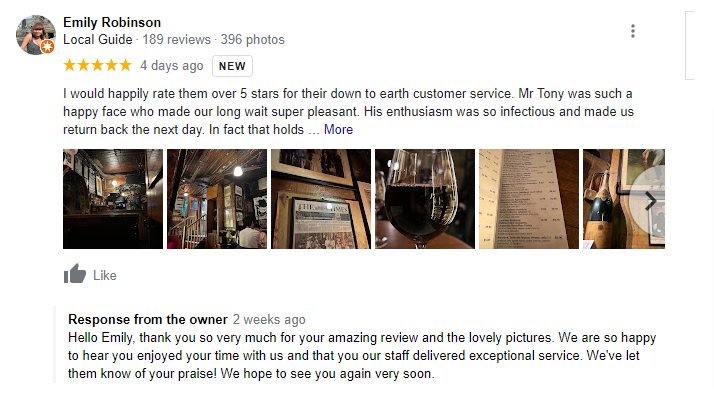
Responding to reviews has two effects. First, it shows future customers that you pay attention and care about feedback. Second, Google's algorithm favors profiles with active owner responses, which means more visibility in local search.
You don't need long responses. A short, specific reply that references the customer's name or their product works better than a generic "Thanks for your review!" Check our Google review response templates with examples for positive, neutral, and negative reviews.
Pro tip: The Reputon app includes AI reply suggestions. It reads the review and generates a response you can tweak and post in seconds. No more staring at a blank reply box.
Make it easy to find your review link
If someone wants to leave you a review, don't make them hunt for it. The fewer clicks between your customer and the review form, the higher your conversion.
- Email signature: Add a short line and direct link to your Google review form in every outbound email.
- Packing slip or receipt: Include a QR code that links directly to your review form. Print it on the packing slip or a small card inside the package.
- Website footer: A small "Leave us a review on Google" link in your footer is visible on every page.
- Social media: Post your Google review link in your Instagram bio or as a pinned post. Ask your followers once a quarter.
Use the Reputon Google Review Link Generator to get your direct review link in one click.